
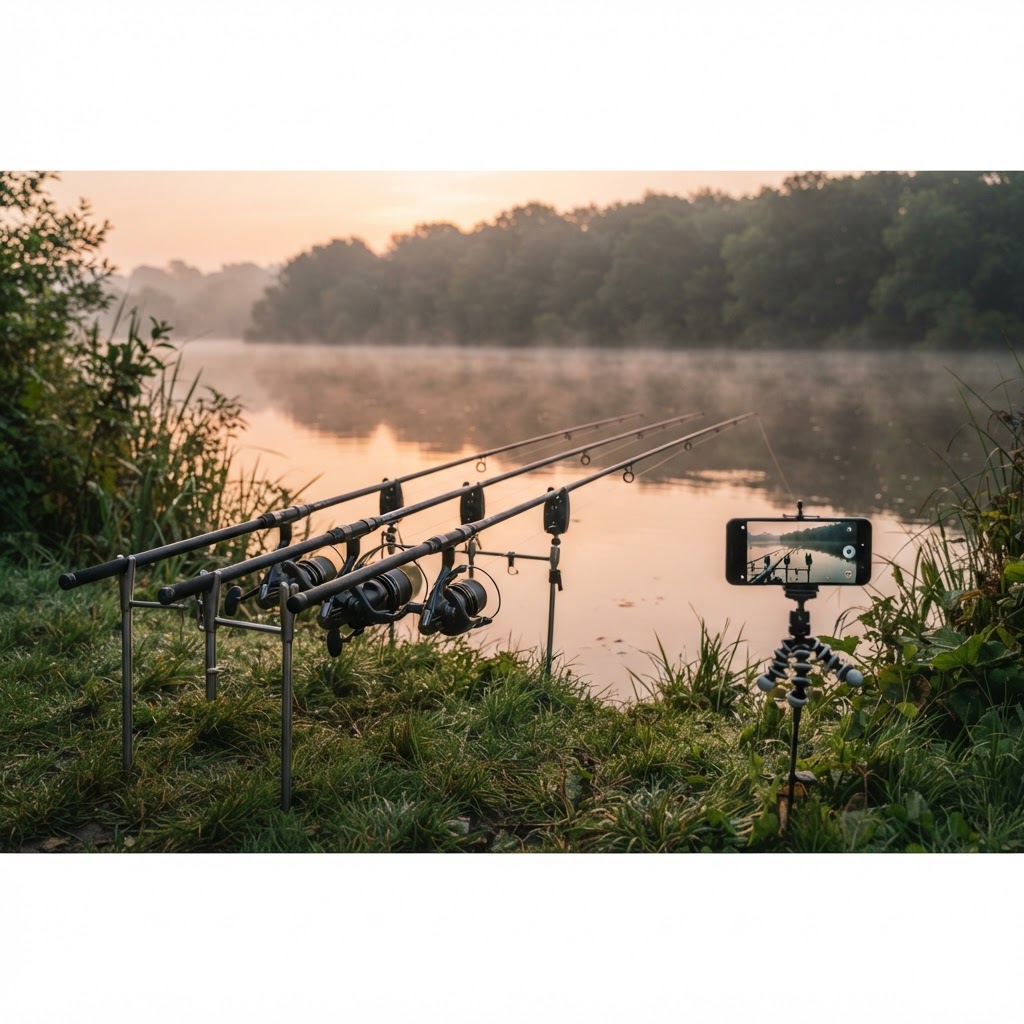
New — Introducing RodWatch
Your phone watches your rods while you fish.
Monitor up to five fishing rods simultaneously using your smartphone camera. RodWatch numbers each tip, follows all of them at once, and tells you which one moved — out loud if you want.
$2.99 one-timeAlso included in the $10.99 Complete Package.
Fishing with several rods means watching several rods
On a bank, in a boat at anchor, or on a catfishing set with four rods out, something is always behind you. RodWatch keeps the phone pointed at the tips and tells you which rod moved, so you are not turning your head every thirty seconds.
- Up to five rod tips tracked at the same time
- Each rod numbered the moment you tap it
- Movement measured against that rod’s own starting position
- Spoken rod number, alarm tone and vibration
- Sensitivity set per rod, not one setting for all of them
- Pause, stop and session history with confirm or dismiss
- Calibrates itself: tap a tip once and it learns that tip’s position and the slow drift of the scene
- Background movement is measured and taken out, so leaves and rippling water do not raise an alert
- Every frame is tracked at two resolutions, so a thin rod tip keeps its edges
Three taps and it is watching
STEP 1
Prop the phone
Stand the phone where every rod tip you care about is in the picture. A small tripod, a rod holder or a tackle box works. The app tells you when the view is too dark or a tip is not being followed.
STEP 2
Tap each rod tip
Tap the tip of each rod on the live picture. They number themselves in the order you tap, one to five, and you can add, remove or reposition any of them before you start.
STEP 3
Start monitoring
RodWatch learns each tip’s starting position and follows all of them together. When one moves enough to matter it tells you which one, and keeps watching the rest.
The alert you actually notice
It says the number
“Possible bite on rod three!” — spoken through the phone speaker or your earbuds.
It shows the number
The rod number fills the banner in red and its marker pulses, so you can read it from across the bank.
It buzzes
Vibration where the phone supports it, so an alert lands even with the sound off.
Several rods can alert at once and the other rods keep being monitored while one is alerting. Alerts repeat only if you ask them to, and a rod does not alert twice for the same movement.
Try RodWatch here, free
No account, no purchase, no camera. Tap the rod tips, start monitoring and move a rod to hear the alert.
RodWatch
SAMPLE DATAWatch up to five rod tips at once and hear which rod moved. Simulated demonstration.
Rods
3
Watching
Idle
Alerts
0
How sensitive
Move a rod
Tap the numbered tips to choose which rods are watched. They number themselves in the order you pick them, up to five. In the app, sensitivity is set per rod and a tip the camera loses is reported as tracking interrupted, never as a bite.
Everything on this screen is generated by the demonstration. No camera is used, and in the app every alert comes from a rod tip the camera actually followed.
What it can and cannot do
- RodWatch reports rod-tip movement it measured in the camera. It does not know what caused the movement, so every alert is a possible bite for you to confirm, never a catch.
- The phone has to see the tips. A rod that leaves the frame, or a tip hidden behind grass, a bag or another rod, is reported as tracking interrupted instead of raising an alert.
- If the phone moves, the whole scene moves, so RodWatch pauses alerts and tells you to steady it rather than blaming a rod.
- Low light, a plain background with nothing to follow, or a tip that barely contrasts with what is behind it all reduce how well a tip can be tracked. The app shows that as low tracking quality.
- The app has to stay open with the screen on. RodWatch does not monitor in the background or on a locked screen.
- Wind, waves, a passing boat wake and a curious dog can all move a rod. The per-rod baseline absorbs slow sway, but a hard gust can still look like a take.
- It is not a bite alarm and it does not watch your rods for you. Stay within reach of them.
Any modern iPhone or Android phone that runs StrikeVision and has a camera can use RodWatch. Spoken alerts need the browser’s speech support and vibration needs a vibration motor; the app shows which of those your device has. No extra hardware and no subscription are required.
What RodWatch costs
RodWatch on its own
$2.99
One-time purchase inside StrikeVision. No subscription, nothing recurring. StrikeVision itself is required.
Get RodWatchIn the Complete Package
$10.99$23.93
The app and all six add-ons, RodWatch included, in one one-time payment. Anyone who already bought the Complete Package gets RodWatch at no extra charge.
Compare the plansRodWatch questions
What is RodWatch?
RodWatch is a StrikeVision add-on for fishing with several rods out at once. You prop the phone where it can see your rod tips, tap each tip on the live picture, and RodWatch numbers them and follows all of them together, up to five. When one tip moves against its own starting position it shows the rod number in large type and can say it out loud, sound a tone and vibrate the phone while the other rods keep being monitored.
How accurate is RodWatch?
RodWatch reports rod-tip movement it actually measured in the camera, in relation to each tip’s own starting position, and it does not publish a detection percentage because that number depends on the phone, the light, the background and how steadily the phone is sitting. What it does guarantee is honesty about its own state: a tip it cannot follow is reported as tracking interrupted, never as a bite, and a phone that moves pauses alerts rather than blaming a rod. You decide whether a movement was a fish, and the session history records your confirm or dismiss.
Does RodWatch tell a bite apart from wind and waves?
It gets part of the way. Each rod has its own slowly moving baseline, so gentle sway from wind and current is absorbed instead of alerting, and a rod only alerts when it moves quickly and far enough from that baseline. A hard gust or a passing boat wake can still move a rod like a take, which is why every alert asks you to confirm or dismiss it rather than declaring a fish.
Will RodWatch work on my phone?
It runs in the StrikeVision app on modern iPhone and Android phones through the camera, with no extra hardware. Spoken announcements need the browser’s speech support, vibration needs a phone with a vibration motor, and the app reports which of those your device has instead of pretending. The screen has to stay on and the app has to stay open while you monitor, and RodWatch does not monitor in the background or on a locked screen.
How much does RodWatch cost?
RodWatch is a one-time $2.99 add-on inside StrikeVision, with nothing recurring. It is also included in the $10.99 Complete Package, and existing Complete Package owners get it at no extra charge.
More answers on the fishing questions page, and the rod-tip tracking behind RodWatch is explained on the TipVision page.